How to Sync the U.F.O. TW with VR Headsets, Phones and PCs
Here's how to sync the U.F.O. TW with each of these devices, with screenshots:
- VR headsets
- Phones
- PCs

I also share the Adult Festa videos I actually bought that sync with the U.F.O. TW (Adult Festa is a Japanese VR video site).
Fair warning: they're insanely cute and insanely hot.
Here's how to sync it with DLsite audio works using CSV files:
 How to Sync the U.F.O. TW to DLsite Audio with CSV FilesStep-by-step guide to driving the VORZE U.F.O. TW with fan-made CSV files and DLsite audio works in Web CSV Player, plus fixes when it won't move.Read the article ›
I also cover what to do when it won't sync, how to find synced titles, and how to buy them.
Can You Use the U.F.O. TW Without Syncing?
Yes. Even without syncing, you can use the U.F.O. TW with its buttons.
Here's my article on exactly how to use it (the controls):
 How to Use the U.F.O. TW: Charging and Controls (with Videos)How to use the VORZE U.F.O. TW, with videos: the 5 modes, pausing, warming, attachments, wearing it, cleaning, charging, storage and a left/right trick.Read the article ›
How to Sync the U.F.O. TW with a VR Headset
VR Headsets That Sync with the U.F.O. TW: Only the DPVR Series (in 2023)
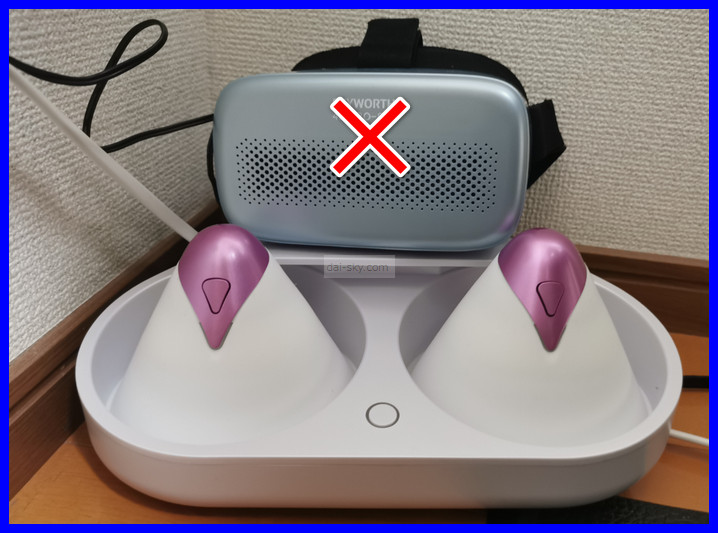
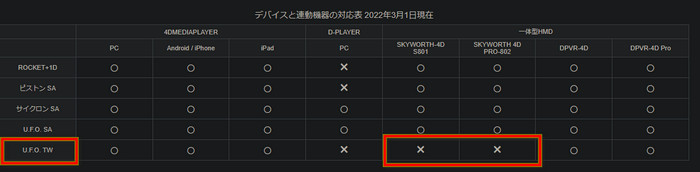
When I wrote this in March 2023, the only VR headsets that synced with the U.F.O. TW were the DPVR series. As of September 2026, Adult Festa's newer 4DMEDIAPLAYER+ app also works with Meta Quest: the Quest connects to your phone over Wi-Fi, and the U.F.O. TW connects to the phone over Bluetooth.
NLS (the official Japanese online store for RENDS/VORZE) has a video showing how to use it.
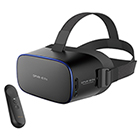
DPVR-4D Pro
How to Sync with a DPVR Headset
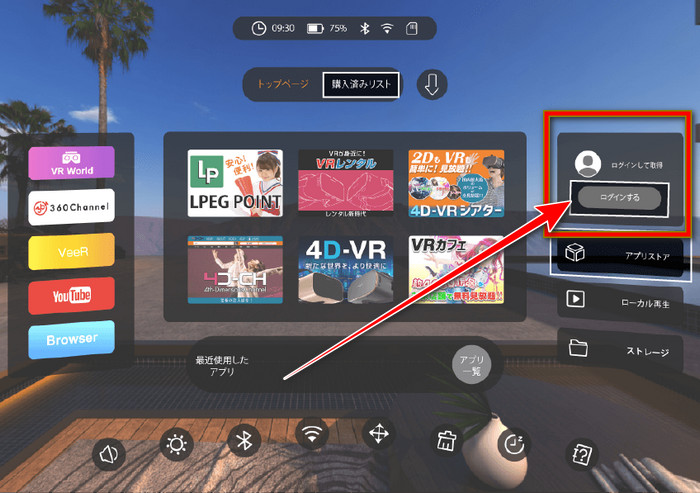
First, log in to Adult Festa and bring up the video you bought.
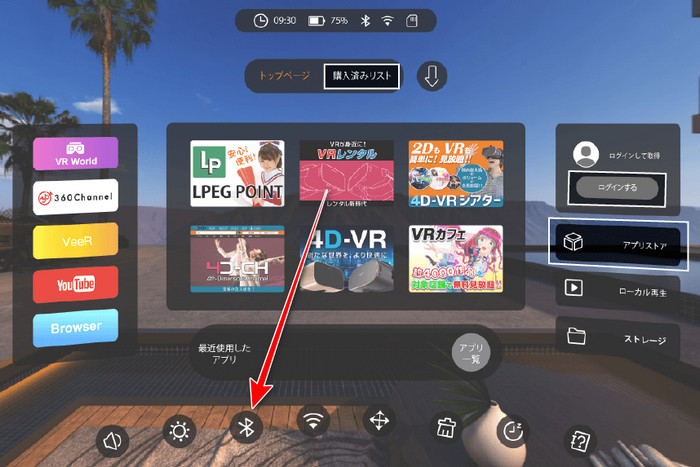
Press the Bluetooth button to start pairing with the U.F.O. TW.
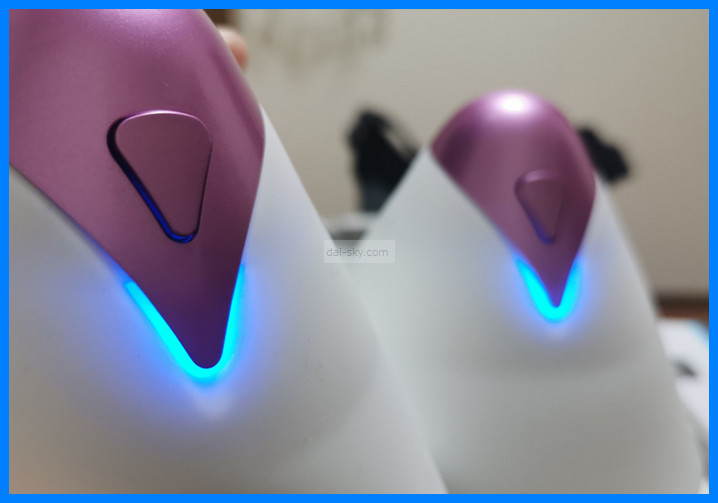
Once the sync is set up, the U.F.O. TW's button light changes from green to “blue.”
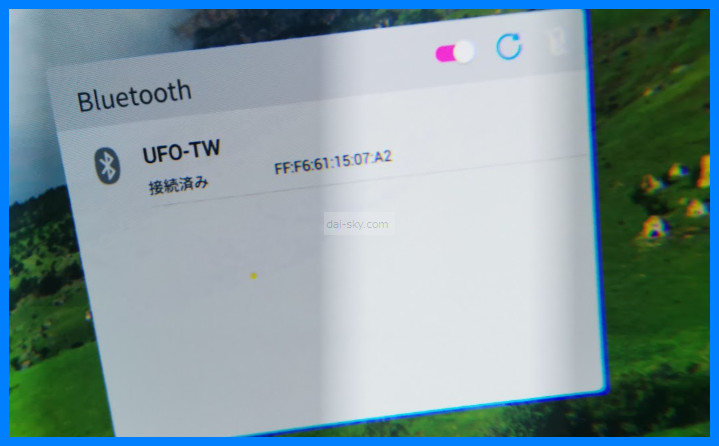
The headset also shows the U.F.O. TW as connected.
Even while it's synced, you can force it to stop by holding down the power button.
You can also sync one cup first and then turn on the other one — both cups will still sync.
[Not Officially Possible] A Trick for Syncing with the SKYWORTH PRO
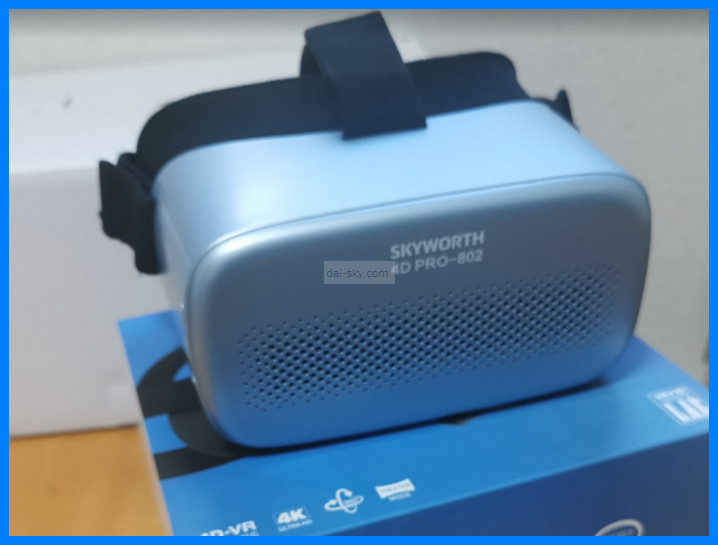
The “SKYWORTH PRO 4DPRO-802” can't sync with the U.F.O. TW directly, but the U.F.O. TW does sync with 4D Media Player on a phone or PC.
So the trick is to start the same video at the same moment on your phone (synced with the U.F.O. TW) and on the SKYWORTH PRO headset — then you can enjoy the sync while watching in the headset.
I explain how to sync with a phone in the next section.
But when I actually tried it, starting both at exactly the same moment was harder than I expected.
If the stream pauses to buffer, the timing drifts, so it's better to download the video onto the VR headset itself.
How to Sync the U.F.O. TW with 4D Media Player on a Phone
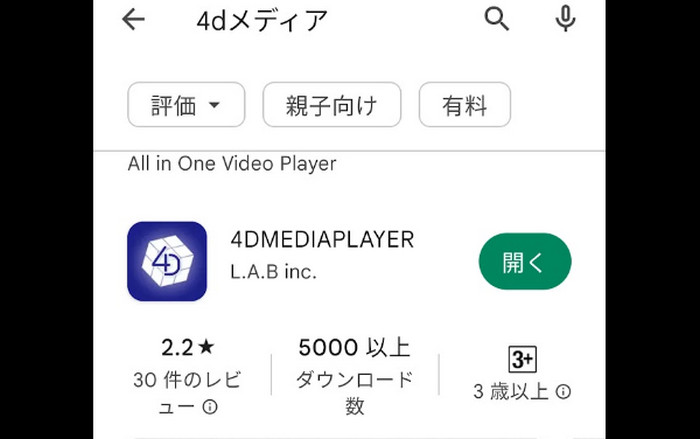
Search Google Play for “4DmediaPlayer” and install it. (As of September 2026, Adult Festa also offers the newer 4DMEDIAPLAYER+ app; in it you connect from Bluetooth in Settings, or from the connect-device button on the playback screen.)
Open 4D Media Player. To log in with your Adult Festa account, tap here ↓↓
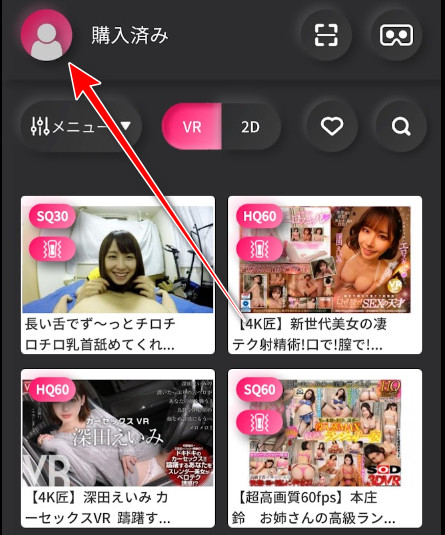
↓ Tap here and enter your Adult Festa login ID and password.
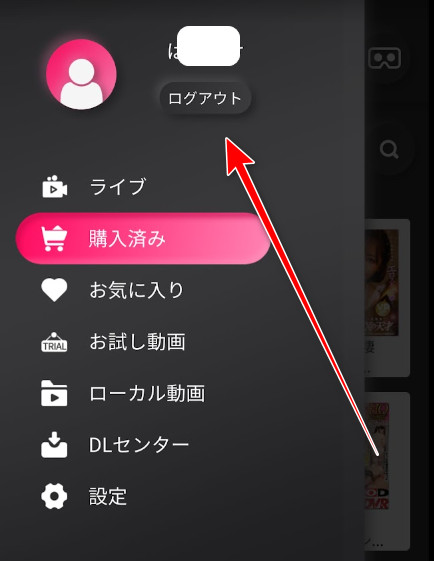
Your Adult Festa purchases will then show up.
Once your phone and U.F.O. TW are synced, you can also enjoy it with a phone VR headset.
Tap Settings. ↓↓
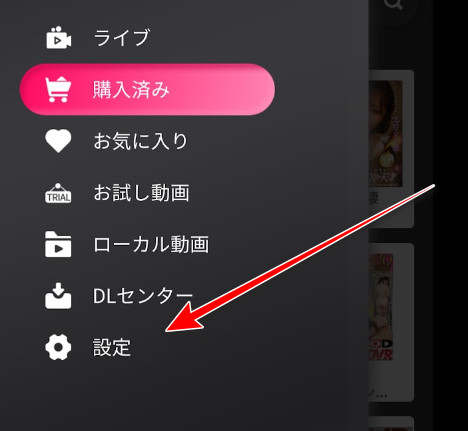
Tap “Bluetooth.” ↓
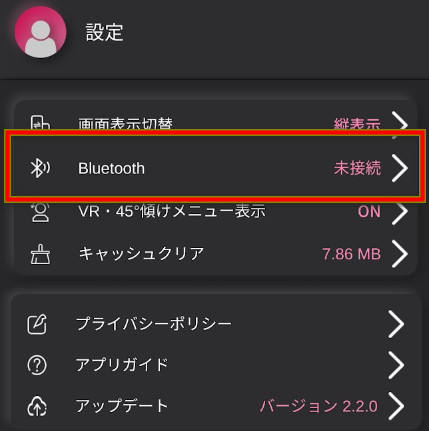
Turn on the U.F.O. TW and the sync is set up.
At first I paired it from my phone's Bluetooth settings, and it wouldn't sync.
If it won't sync, unpair it and connect from the app instead.
Also note that the sync pauses while you're using 4D Media Player's controls ↓↓
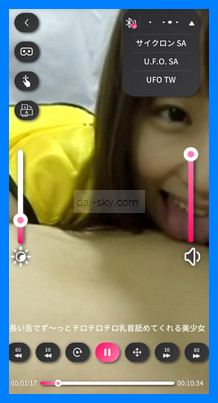
It doesn't sync while the control screen is showing, but that doesn't mean it's broken.
I explain how to use a phone VR headset and more in this article:
 How to Sync the A10 Piston SA with VR (Adult Festa) and the Best HeadsetVORZE A10 Piston SA VR sync guide: which headset to buy, step-by-step syncing with Adult Festa on SKYWORTH, PC and smartphone, and buying videos with points.Read the article ›
How to Sync the U.F.O. TW with the Player on a PC
The advantage of syncing the U.F.O. TW with a PC is that you can enjoy it on a big screen.
The steps are almost the same as on a phone.
You'll need to install 4D Media Player on your PC.
I explain exactly how to install it here:
How to Sync the A10 Piston SA with VR (Adult Festa) and the Best HeadsetVORZE A10 Piston SA VR sync guide: which headset to buy, step-by-step syncing with Adult Festa on SKYWORTH, PC and smartphone, and buying videos with points.Read the article ›
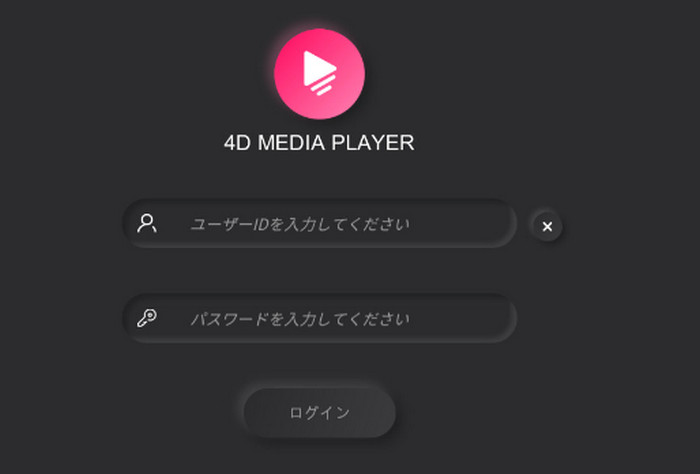
Open 4D Media Player and log in with your Adult Festa account.
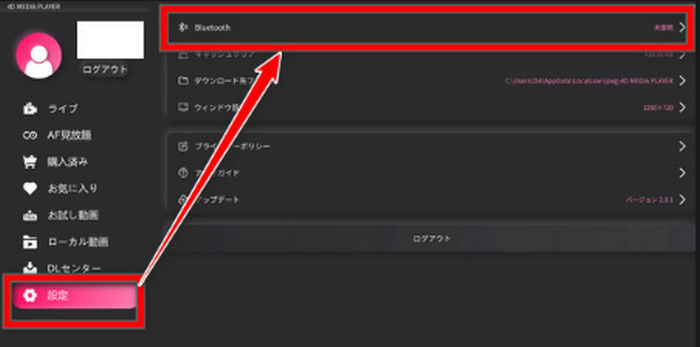
Press the Settings button and open the Bluetooth settings.
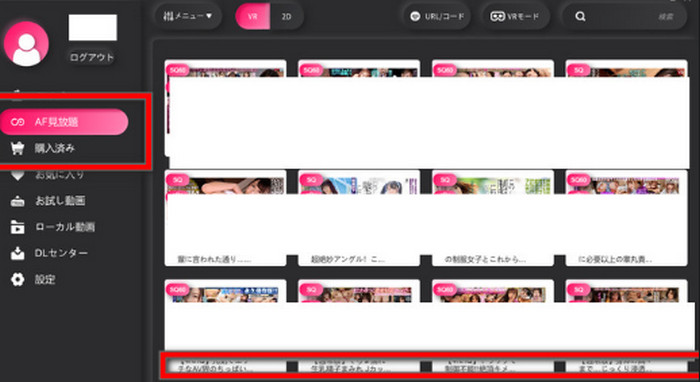
Click “AF all-you-can-watch” or “Purchased” and play a U.F.O. TW synced video, and it syncs.
What to Do When the U.F.O. TW Won't Sync
Is it wrong that both cups make the same movement?
It's normal for the U.F.O. TW's left and right cups to make the same movement.
That's how it's designed, so nothing is wrong.
Turn off your PC, phone or anything else that uses Bluetooth
It may be interfering with other Bluetooth devices.
Just turning Bluetooth off and on again may fix it and get it syncing.
Adult Festa's official site has a note saying the same thing.
Check whether your device can sync with the U.F.O. TW at all
The SKYWORTH PRO VR headset can't sync with the U.F.O. TW (still true as of September 2026).
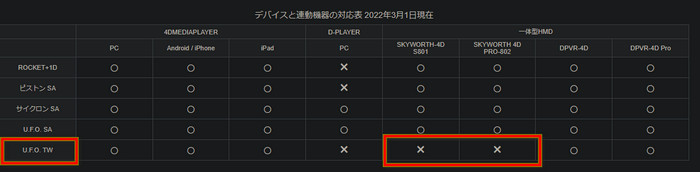
>>> Adult Festa's sync compatibility chart (in Japanese)
What to do when only one cup syncs
When I synced the U.F.O. TW with 4D Media Player on my PC, for some reason only one cup rotated.
To be precise, the faulty one just ticked along slowly, like the second hand of a clock.
At first I thought the U.F.O. TW itself was the problem.
But with 4D Media Player on my phone, both cups synced fine.
So I could tell the device itself wasn't the problem.
If you have a DPVR headset, try syncing with it to narrow down the cause.
If you have another PC, install 4D Player on it and see whether it syncs there.
That way you can pin down what's wrong.
It could also be a problem with a particular video, so try buying a different one and see whether it syncs.
For other problems and breakdowns, see this article:
 U.F.O. TW Broken? Repairs and the Maker's WarrantyIs the VORZE U.F.O. TW covered by a warranty? What VORZE told me about repairs and costs, the current 3-month warranty, and how to fix common problems yourself.Read the article ›
How to Find and Buy U.F.O. TW Synced VR Videos on Adult Festa
I emailed Adult Festa to confirm that videos listed only as “UFOSA” in the synced-video section also sync with the U.F.O. TW.
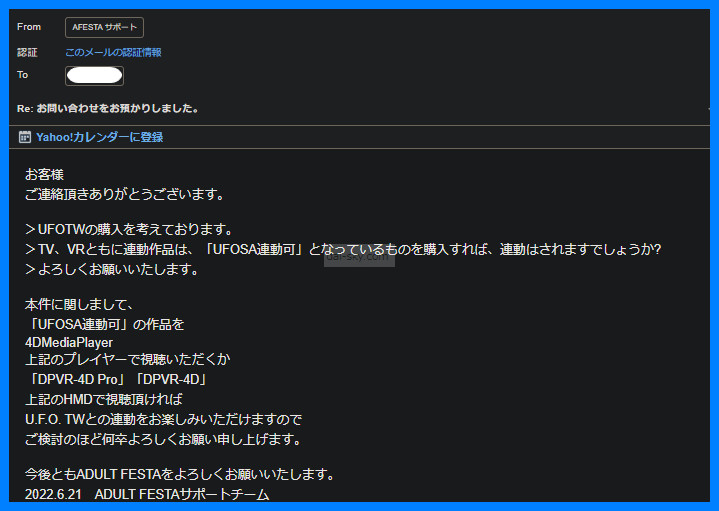
There's “Adult Festa TV” and “Adult Festa VR.”
When I wrote this, the synced titles were on “Adult Festa VR,” so watch out for that. (As of September 2026, Adult Festa also sells U.F.O. TW sets that come with a 2D video.)
Finding synced videos on a PC
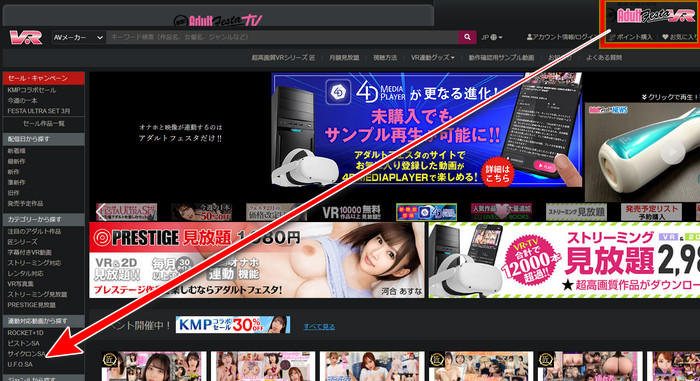
Click “UFOSA” under “Find synced videos,” and the U.F.O. TW synced titles are listed.
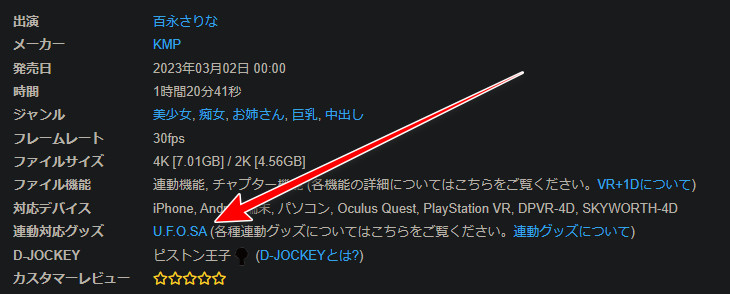
Just to be safe, check that the synced-goods field says “UFOSA” before you buy. ↓↓
Some titles have reviews saying “it wouldn't sync,” so those are worth checking too.
Then again, whether it syncs depends on each person's device and setup, so it's hard to say for sure.
Finding synced videos on a phone
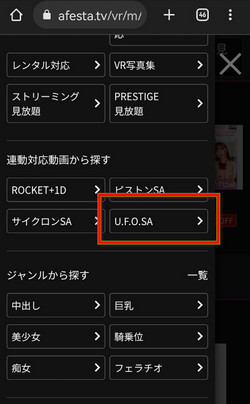
Tap the search button.

Tap “UFOSA” under synced titles, and the U.F.O. TW synced titles are listed.
If you don't want to use a credit card, you could also pay with PayPay (a Japanese mobile payment app) through BitCash (prepaid e-money).
I explain how in the second half of this article:
How to Sync the A10 Piston SA with VR (Adult Festa) and the Best HeadsetVORZE A10 Piston SA VR sync guide: which headset to buy, step-by-step syncing with Adult Festa on SKYWORTH, PC and smartphone, and buying videos with points.Read the article ›
How to Sync the U.F.O. TW with DLsite Audio
Personally, I like syncing it with audio works even more than with VR videos.
There are more audio works than VR videos to choose from.
If you haven't tried it, you're missing out…
Here's my article on syncing it with audio, using files made by fans:
How to Sync the U.F.O. TW to DLsite Audio with CSV FilesStep-by-step guide to driving the VORZE U.F.O. TW with fan-made CSV files and DLsite audio works in Web CSV Player, plus fixes when it won't move.Read the article ›
[Insanely Cute] Recommended Adult Festa Videos That Sync with the U.F.O. TW

For nipple-play synced titles, by far the cutest is the amateur-looking girl in this video.
It was the first title I bought for the U.F.O. TW.
If you like natural, amateur-looking girls, you can't go wrong with this one.
I can't tell whether she's really an amateur, but she's not a face you often see among AV actresses.
- “So you like having your nipples licked, huh?”
- “You're getting hard. But you have to stroke it yourself, okay?”
She talks like that, slow and sticky, and it hit the spot perfectly.
She doesn't strip, but you catch glimpses of her nipples, which is irresistible.
It was pricey at over ¥1,000 for 10 minutes (March 2023), but it's worth every yen ↓↓
>>> [Adult Festa] A pretty girl who keeps licking your nipples with her long tongue — see details
Mikako Abe and Noa Eikawa

I bought this U.F.O. TW synced title for ¥780 (March 2023).
They're both petite and super cute.
Obviously, their skin is gorgeous…
It's an SOD (Soft On Demand) title, an hour and a half long, and they tease you with dirty talk and make sure you finish.
At first they roll your nipples around and make you come with a handjob.
Since it's a nipple-sync title, one of them is always playing with your nipples.
It doesn't sync with the A10 Piston SA, so I ran that one with its buttons.
Here's the video ↓↓
Here's my story of buying a genuine unit (not a fake) at the lowest price:
 Where to Buy a New U.F.O. TW for the Lowest PriceWhere to buy a genuine VORZE U.F.O. TW in Japan: I checked 10+ shops, ordered from NLS step by step, and found a phishing site selling fakes.Read the article ›